
Agents
Remux notices which panes are running an AI coding agent such as Claude Code or Codex, and tells you what each one is doing. It answers one question across every session and machine: which of my agents needs me right now?
It works out of the box for claude, codex, aider, gemini, omp and opencode. The [agents] config section is optional.
Agent states
Section titled “Agent states”Each agent pane is in one of three states, checked in this order:
| State | Colour (default) | Meaning |
|---|---|---|
| Needs input | red | A configured pattern matches the bottom of the pane’s screen: the agent is blocked on a prompt or question. |
| Working | yellow | Output reached the pane within the last working_ms milliseconds. |
| Idle | dim | Neither. |
“Needs input” wins over “working”: a spinner running under an approval prompt is still blocked. It also never fades on silence, because the prompt is still on screen.
The colours are theme roles: needs input uses tab_bell_fg, working uses tab_activity_fg and idle uses status_bar_fg. See Theme.
See your agents
Section titled “See your agents”Agent switcher
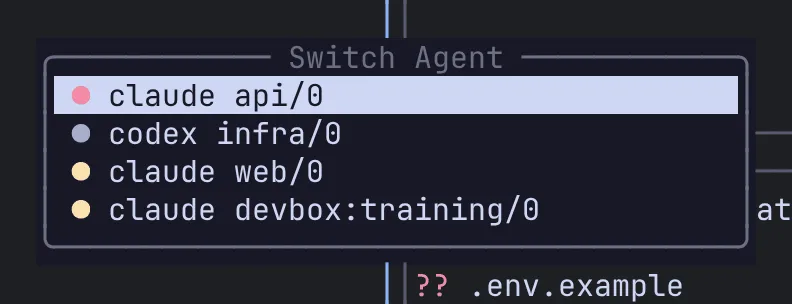
Section titled “Agent switcher”Press Alt-a (or Ctrl-a x a) to open a list of every agent pane on the local server and every connected remote, coloured by state. It needs no sidebar.
| Key | Action |
|---|---|
j / k (or arrows) |
Move |
g / G |
Jump to the top / bottom |
Enter or l |
Jump to that pane |
Esc or q |
Close |
Agents panel
Section titled “Agents panel”For an always-visible list, dock an agents panel in a sidebar:
[[sidebar]]edge = "right"size = 34
[[sidebar.panel]] plugin = "agents"j/k/g/G move and Enter jumps to the pane. The row for the pane you are currently in is highlighted with sidebar_current_bg.
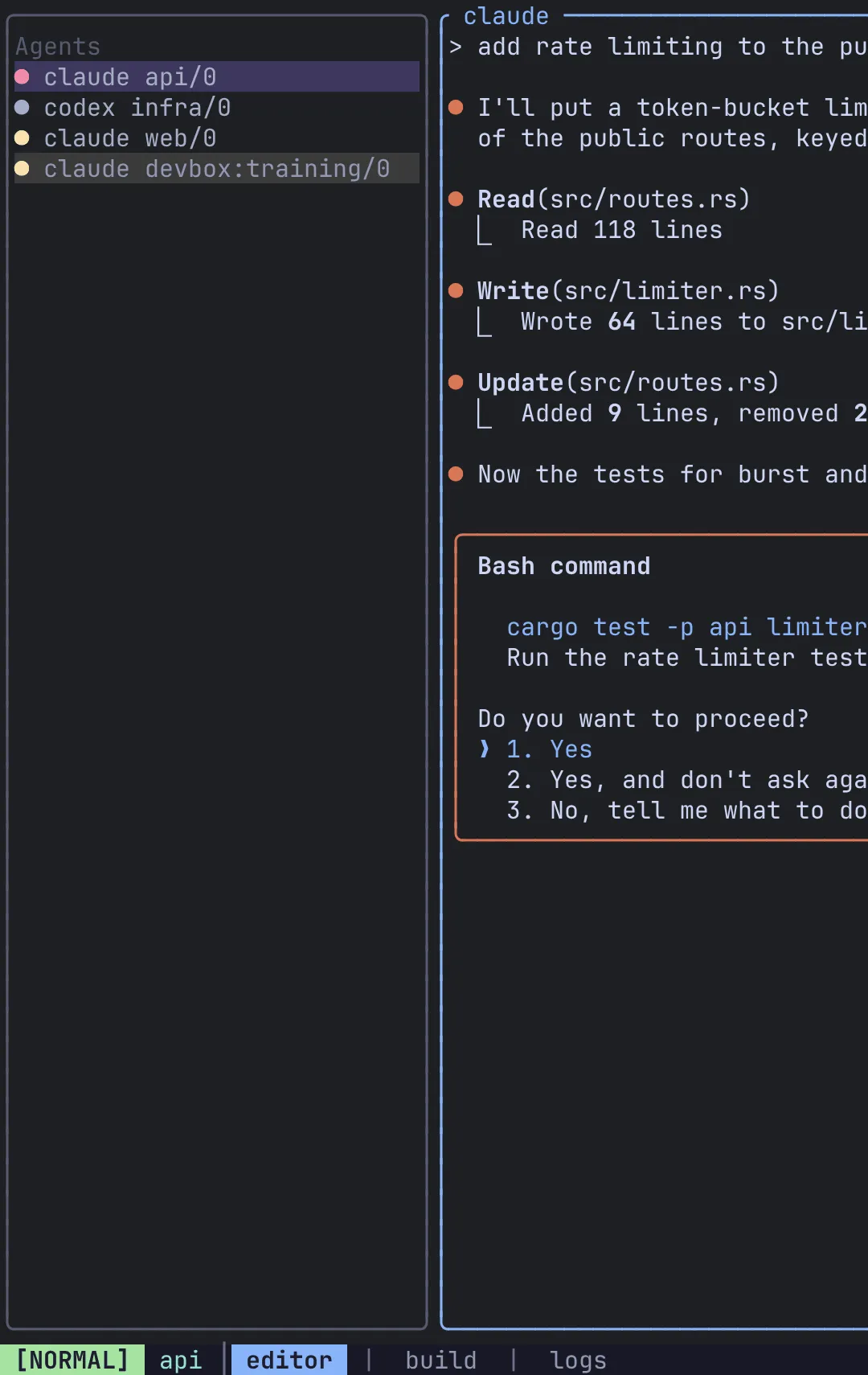
Agents are named by your pane_title template. With no template, an agent shows its window title, or command session/tab (for example claude main/1) when it has none. Agents on a remote are prefixed with the remote’s name.
Configure detection
Section titled “Configure detection”[agents]commands = ["claude", "codex", "aider", "gemini", "omp", "opencode"]working_ms = 500scan_rows = 24| Key | Default | Meaning |
|---|---|---|
commands |
["claude", "codex", "aider", "gemini", "omp", "opencode"] |
The foreground commands that count as an agent. Panes running anything else are not listed. |
working_ms |
500 |
How recently output must have arrived for a pane to read as working. |
scan_rows |
24 |
How many lines up from the bottom of the pane’s live screen the patterns are matched against. Wrapped lines are joined first. |
The same options, with the exact built-in regexes, are in the config reference.
List the agent itself, never its launcher. An agent installed through npm or bun often runs as a node or bun shim, or is started with npx/bunx; Remux looks through the launcher to the agent it started. Listing node would put every Node REPL on the machine in the list.
Blocked-prompt patterns
Section titled “Blocked-prompt patterns”Each [[agents.pattern]] is a regular expression matched line by line against the bottom of the pane’s screen. A match means the agent is waiting for you.
[[agents.pattern]]name = "claude-proceed"command = "claude"regex = "(?i)do you want to (proceed|continue|allow|use this api key)"| Field | Meaning |
|---|---|
name |
A short label, written to the server log when this pattern decides a pane’s state. |
command |
The agent this pattern applies to. Omit it to apply the pattern to every agent. |
regex |
The pattern, in Rust regex syntax. An invalid one is logged and skipped; the others still work. |
Remux ships these patterns:
| Name | Agent | Matches |
|---|---|---|
claude-proceed |
claude |
Permission prompts (“Do you want to proceed?” and similar) |
claude-select |
claude |
The question menu’s footer (“Enter to select … Esc to cancel”) |
codex-approve |
codex |
Approval prompts (“Would you like to run …”) |
codex-decline |
codex |
The “No, and tell Codex what to do differently” option |
omp-allow |
omp |
“Allow tool:” |
opencode-permission |
opencode |
“Permission required” |
opencode-allow |
opencode |
The “Allow once / Allow always / Reject” row |
The server log records why each pane was classified as it was, and which pattern matched. If a pane is stuck on “needs input” or never turns red, check server.log (see Troubleshooting), adjust the pattern and run remux restart.
Platform support
Section titled “Platform support”Detection reads the pane’s foreground process, so it sees claude running inside your shell. It works on Linux and macOS. What matters is the platform of the server running the pane: a macOS client attached to a Linux server detects fine, and the reverse too.
A server that cannot detect agents shows <server>: no detection in the list (for example local: no detection) rather than an empty list that would look like “no agents running”.